Set up the Countz plugin in Claude
Countz Accounting is a plugin for Claude Cowork and Claude Code. You add it once, connect it, and then ask for an analysis in Claude in plain words or with a command.
1. Add the plugin
In Claude, open Manage plugins and choose the Discover tab. Search for countz, then click Add next to Countz Accounting.

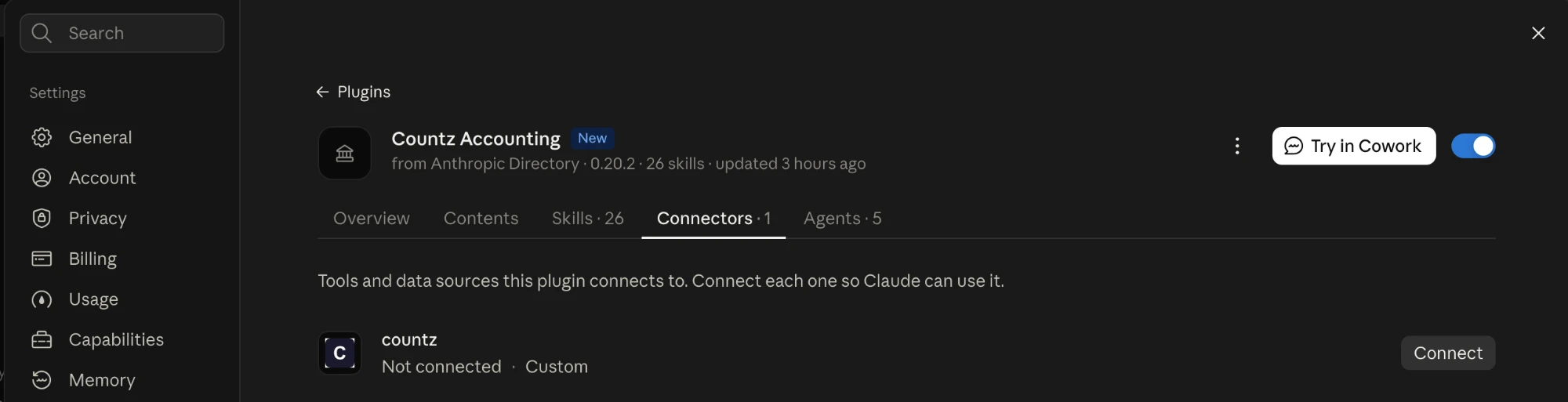
2. Connect the countz connector
Once the plugin is added, open Countz Accounting and go to the Connectors tab. Click Connect next to countz.
The analyses need the connector to run: it supplies the procedure each analysis follows. The next section says what it sends and receives.
3. Run an analysis
In Claude Cowork or Claude Code, type the analysis you want and say where the data is: a folder on your computer, or data from another connector you already use in Claude.
For example, to find where invoices are not turning into cash, with the receivables reports in a folder called ar-september:
/revenue-leak ~/Documents/ar-september
You can also say it in words: "Find where our invoices are not turning into cash. The data is in the ar-september folder in Documents."
Claude reads the files, drafts a plan of the checks for your data, and asks you to confirm it before it runs. You get an Excel workbook and a report deck, and every figure traces back to the source data.
A local folder works best. Connectors to other systems often limit how much data one request can transfer, so a large report can arrive incomplete. Save the reports to a folder and point Claude at it.
What the plugin and the connector do
The plugin carries the code. It installs the code the analyses use to read your files, reconcile and tie out the figures, and build the workbook and the report deck. Every number in the result is calculated by that code from your files. Claude drafts the plan and writes the commentary, and it does not do the arithmetic itself.
The connector carries the procedures. Each analysis follows a written procedure, which Countz calls a recipe: what to check, in what order, and what the report must show. The countz connector serves the current version of each recipe when an analysis starts, so a corrected or improved procedure reaches you without reinstalling the plugin.
- With free access, the recipes are general ones that follow accounting best practice.
- For paying customers, Countz tunes the recipes to the company's own needs.
Your files stay with you. Claude reads your files in your own Claude account, and Countz does not receive them. When you describe an analysis that is not in the list, Claude sends Countz a short description of it with amounts, names and file names taken out, and shows you that text before it sends it.
What it costs, and how long it takes
The plugin and the general recipes are free. The usage is yours: an analysis counts toward your Claude plan's usage limits, or is billed to your API account if Claude Code runs on an API key.
A complex analysis can run for hours and use a large part of your usage limits. Start with one analysis on one folder to see what it uses.
See the Terms of Service and the Privacy Notice.
Feedback
Write to support@countz.ai with what worked, what did not, and anything the analysis missed.